
Webex Calling Licensing Explained — Flex, Calling Plans, and What to Actually Buy
Before You Open CCW
Webex is the stronger platform. The call quality, the feature depth, the roadmap — it wins on the merits. But licensing cost is a real constraint, and if a customer’s existing infrastructure already covers Teams Phone at no additional spend, that conversation ends before it starts. This article assumes you’ve already made the platform decision and Webex is the answer. If you’re still working through that, the Webex Calling vs Microsoft Teams Calling article covers that decision in full. Come back here once Webex is the answer.
What follows is a practical starting point for sizing a Webex Calling deployment in CCW — the jargon you need, the selections that matter, and the mistakes that cost money at renewal. Cisco’s licensing universe under A-FLEX-3 is broad. This doesn’t cover all of it, and you should verify specifics with your Cisco rep or partner before finalizing any quote. The goal here is to get you oriented enough to have that conversation intelligently.
The Foundation: A-FLEX-3 in CCW
Webex Calling licensing lives under a single master license in Cisco Commerce Workspace called A-FLEX-3. Everything you’re building — users, workspaces, PSTN connectivity, calling features — gets configured as options underneath it. When you open a new quote in CCW, this is your starting point.

Users vs. Spaces — The Same Split as Teams, Different Names
Cisco draws the same fundamental distinction Microsoft does, just with different terminology.
A User — also called a Knowledge Worker — is a person who needs a full Webex account: their own extension, voicemail, the Webex app on desktop and mobile, call history tied to them personally. Every named individual who makes and receives calls as part of their job is a User.
A Space — licensed as a Workspace for Common Area — is a phone assigned to a location, not a person. Lobby phones, conference rooms, break rooms, shared desks on a shop floor. No personal account, no voicemail, just calls in and out. Spaces are significantly cheaper than full user licenses and the same right-sizing logic applies here as it does in Teams: don’t license a room phone as a full user.
Getting this split right before you build the quote is where most of the savings happen.
Named User vs. Enterprise Agreement
The next decision is your agreement type, and it changes the math on workspaces significantly.

Named User is the standard path for most deployments. You license exactly what you need — users and workspaces — at standard rates. No minimum commitment thresholds beyond what Cisco requires for the product tier.
Enterprise Agreement is for larger deployments, typically 250 or more users. The meaningful difference is that EA includes a 50% workspace entitlement on top of your user count at no additional cost. That entitlement changes your workspace math before you’ve added a single paid workspace line.
Here’s what that looks like in practice:
| Scenario | Users | EA Workspace Entitlement | Paid Workspaces Needed | Total Workspaces |
|---|---|---|---|---|
| 300 users, 175 spaces needed | 300 | 150 (50% of 300) | 25 | 175 |
In that example, you’re buying 25 workspaces instead of 175. At scale, that entitlement is real money. If you’re anywhere near 250 users, run the EA numbers before you quote Named User.
The 20% Growth Allowance — Cisco’s Built-In Overage Buffer
One thing Cisco does that Microsoft doesn’t is give you a built-in overage allowance on every tenant. You can exceed your licensed user and workspace count by up to 20% without triggering an immediate licensing requirement. That overage gets trued up at your next renewal or agreement review — not on the day someone gets provisioned.
In practice this means if you deploy for 100 users and hiring moves faster than expected, you’re not making an emergency call to your Cisco rep the day employee 101 gets onboarded. You have runway. Plan to true up, but you’re not locked out or out of compliance the moment you go over.
A few things to keep in mind:
- The 20% is an overage buffer, not a discount — you will true up and pay for those licenses, just not immediately
- It applies to users and workspaces, not to Committed Outbound Users — keep that number accurate at provisioning
- It’s not a reason to under-license intentionally at deployment time, but it does take the pressure off in fast-growth environments
Worth mentioning to customers during the quote conversation — it’s a real operational advantage over how Microsoft handles overage and it often lands well.
Building the License Stack in CCW
Once you know your agreement type and your user/space split, the actual selections in CCW are straightforward. For a standard Webex Calling deployment you’re selecting:
- Named User — Calling NU (or the EA equivalent)
- Calling Deployment Choices — Webex Calling
- Webex Calling Options — Professional (for users) and/or Workspace for Common Area (for spaces)
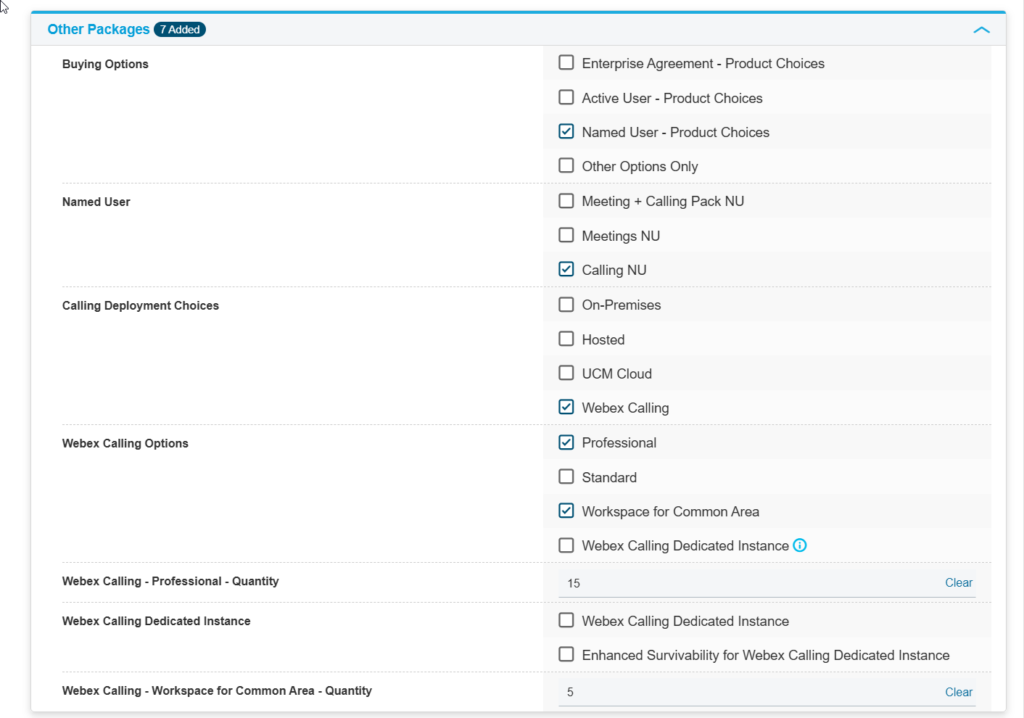
The screenshot above shows a small business setup — 15 users and 5 workspaces. The structure is the same regardless of size. You’re just changing the quantities.
Committed Outbound Users — The Gotcha That Breaks Outbound Calling
This is the most common licensing mistake in a Webex Calling deployment and it’s easy to miss because it doesn’t fail loudly at provisioning — it just silently prevents outbound calls on affected devices.
To enable outbound calling on every phone, you need to add Committed Outbound Users to your quote. The number must equal your total users plus total workspaces combined. Not just users. Not just the phones you think will make outbound calls. Every device that needs to dial out.
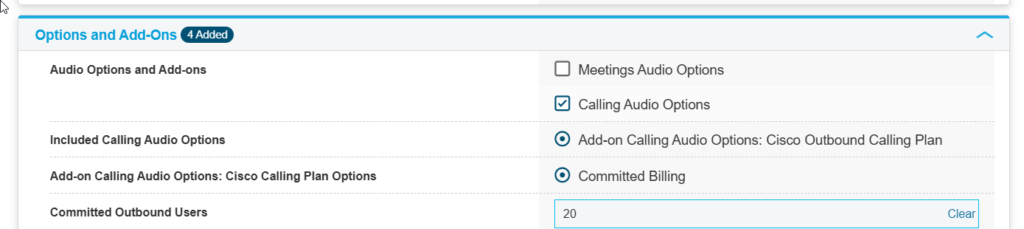
| Users | Workspaces | Committed Outbound Users Required |
|---|---|---|
| 15 | 5 | 20 |
| 300 | 175 | 475 |
If that number is short, the phones without coverage can receive calls but cannot place them. It’s a quiet failure that shows up on go-live day when someone picks up a lobby phone and gets nothing. Set it to the full combined count and move on.
PSTN Connectivity: Cloud, Operator Connect, or Direct Routing
The license stack above covers the Webex Calling software and features. It doesn’t connect you to the public telephone network. You need a PSTN option on top, and the right choice depends on your deployment size and cost tolerance. The full decision framework for all three options is covered in the PSTN Options in Webex Calling article.
Cloud PSTN (Cisco Calling Plans)
Cisco acts as your carrier. Phone numbers, calling capacity, and billing all live inside your Webex organization. It’s the simplest path — no carrier contracts, no additional infrastructure, everything managed through Control Hub. The trade-off is cost. Cloud PSTN is the most expensive way to run Webex Calling at scale, and the per-user per-month pricing compounds quickly in larger deployments.
For small deployments under roughly 500 users with straightforward calling needs, Cloud PSTN is usually the right default. It’s clean, it’s fast to provision, and the operational overhead is minimal.
Operator Connect
Once you’re approaching 500 users, Cloud PSTN pricing becomes hard to justify and Operator Connect becomes the conversation. Cisco-certified carriers connect their PSTN infrastructure directly to your Webex organization through a certified integration. You manage numbers and assignments through Control Hub the same way you would with Cloud PSTN, but the carrier relationship, pricing, and calling plans are negotiated directly with the operator.
The practical advantages at volume: better per-seat or per-minute rates than Cisco’s standard plans, more flexibility on international calling and toll-free numbers, and a real support relationship with a carrier who is accountable for call quality. The calling experience for end users is identical — the difference is entirely on the cost and management side.
Direct Routing (Local Gateway)
Direct Routing in Webex Calling connects your existing SIP carrier or on-premises telephony infrastructure to Webex through a Local Gateway — Cisco’s term for the certified Session Border Controller in this context. This is the right path when a customer has an existing carrier contract they’re not ready to exit, needs to maintain on-premises PBX connectivity during a phased migration, or has routing requirements that managed services can’t accommodate.
The complexity trade-off is the same as it is in Teams: you gain full control over carrier selection and call routing, but you’re taking on Local Gateway management, SIP trunk configuration, dial plan maintenance, and a more involved change management process. Direct Routing is not a cost-saving measure — it is a flexibility trade-off. Run the full numbers including Local Gateway licensing and ongoing management overhead before recommending it over Operator Connect.
Quick Reference: Webex Calling License Checklist
| Component | What to select | Notes |
|---|---|---|
| Master license | A-FLEX-3 | Starting point for all Webex in CCW |
| Agreement type | Named User or Enterprise Agreement | EA at 250+ users — check workspace entitlement math |
| User license | Calling NU — Professional | Per knowledge worker |
| Workspace license | Workspace for Common Area | Per shared/room phone |
| Outbound calling | Committed Outbound Users | Must equal total users + workspaces |
| Growth buffer | 20% overage allowance | True up at renewal — not a reason to under-license |
| PSTN | Cloud, Operator Connect, or Direct Routing | Cloud for simplicity; Operator Connect at ~500+; Direct Routing for complex/existing carrier |
Final Thoughts
The two mistakes that cost the most in Webex Calling quotes are licensing spaces as full users and under-counting Committed Outbound Users. Get those two right and you’ll build a tighter quote than most. If you’re anywhere near 250 users, model the EA workspace entitlement before you finalize — the savings on that line alone can shift the platform cost conversation.
For PSTN, don’t default to Cloud just because it’s the simplest path. At 500 users the cost delta against Operator Connect is significant enough to warrant the conversation with your carrier options before the quote goes out. And when you do go live, the 20% growth buffer means your first wave of new hires doesn’t require an emergency licensing call — just a clean true-up at renewal.